Tuesday, August 06, 2013

Active Directory and XenDesktop


When you install the Virtual Desktop Agent (VDA) on a VDI computer, you can use Active Directory or the local computer Registry to find Desktop Controllers (DDCs). If you have multiple domain the VDI computers and the DDCs need to be in a common domain (or in a trusted AD domain).

To use AD an Organisational Unit (OU) is created and contains the DDCs for the site.  You can create the OU in the installation or if you create the OU manually run the PowerShell script called Set-ADControllerDiscovery.ps1

XenDesktop creates the following objects:

  • A Controllers security group (all controllers in the site must be in this group)
  • The DDCs must have the 'Access this computer from the network' permission so give the DDCs security group this privilege
  • A container called RegistrationServices is created in the OU for the each XenDesktop site. This contains one SCP object for each controller in the site
  • A Service Connection Point (SCP) object contains the information about the XenDesktop site
  • The SCP is created when the Set-ADControllerDiscovery.ps1 script is run. Each time the controller starts, it validates the contents of its SCP and updates them if necessary

Administrators of XenDesktop require permissions to create and delete children on the RegistrationServices container and to set properties on the Controllers security group.  These permissions are granted automatically by running the Set-ADControllerDiscovery.ps1 script as the new administrator.

Information is updated in Active Directory when the following happen:

  • Installing XenDesktop
  • Uninstalling XenDesktop
  • When a DDC starts
  • When a DDC update the information in its SCP
  • Or when Set-ADControllerDiscovery.ps1 is run

Thursday, August 01, 2013

Troubleshooting XenDesktop 5 Registration


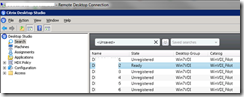
The Desktop State column in the Desktop Controller provides information about the registration state of the desktop machine; values of Not Registered or Pending indicate that registration has not successfully completed.
image

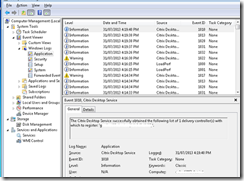
Let me start with this, IT IS THE FIREWALL ! Client and Server, via the GPO !
image

Virtual Desktop Firewall

  • Registration fails if the firewall on the Virtual Desktop Machine has not had the appropriate exclusions configured to enable DDC’s communication.
  • Follow CTX116843 to fix this


Ok, if you made it this far it is more complicated. Start through this list:

Domain Name Services (DNS)

  • use ‘ping <othermachine.yourdomain.com>’ from each other to ensure resolution works

Time Synchronisation not Properly Configured

  • Ensure time is within 3 minutes – Setup NTP on the Hypervisor platform, the Domain Controllers if not already (or the clients if they dont get it from a DC)

XenDesktop VDA Registry Key

  • Verify that the following registry key exists and has correct information:
    (x86) HKEY_Local_Machine\Software\Citrix\VirtualDesktopAgent
    (x64) HKEY_Local_Machine \Software\Wow6432Node\Citrix\VirtualDesktopAgent
    • ‘ListOfDDCs’ REG String
    • ‘NameOfDDC’

image

Service Principal Names (SPNs)

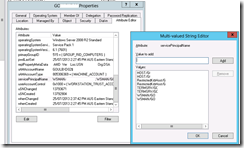
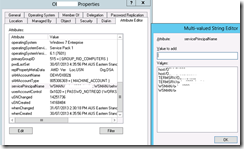
  • The DDC determines the virtual desktop’s SPN by inspecting the servicePrincipalName attribute of the associated computer account in Active Directory. You can inspect the virtual desktop’s computer account using tools such as AD USers and Computers (attribute editor). If the servicePrincipalName attribute does not include an entry with the computer’s FQDN, editing it manually and check to see if that fixes registration problems.
image

image

Domain Membership Problems

  • Removing the machines in question from their domains and re-join them to the domains.

Multiple Network Adapters

  • If the virtual desktops contain multiple network adapters that can be used to communicate with the DDC, this might cause the security negotiation to fail. In that case, try disabling all network adapters except for the one used to communicate with the DDC.

Local Security Policy Settings

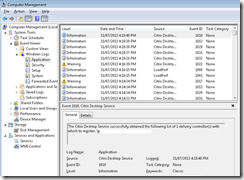
  • In case of some images, an overly restrictive security policy settings might prevent the VDA from registering.
image


User XDPing, ugly but helpful.


XDPing 2.1.1.1

--------------------------------------------------------------------
Local Machine::

  NetBIOS Name = OEH7004
  OS Version   = Microsoft Windows NT 6.1.7601 Service Pack 1
  Platform     = X64 Platform

  Computer Domain: COLVIN.com
    Role       = Member Workstation
    Membership = Verified, SID:S-1-5-21-2723282484-2951877577-328923344-98806 [OK]

--------------------------------------------------------------------
User::

  User Name      = bennetsx
  User Domain    = DEC
  Authentication = Kerberos [OK]
  Groups:
     COLVIN\Domain Users
     Everyone
     BUILTIN\Users
     NT AUTHORITY\INTERACTIVE
     CONSOLE LOGON
     NT AUTHORITY\Authenticated Users
     NT AUTHORITY\This Organization
     LOCAL
     COLVIN\G-SE-XENAPP-BRIMS_HRAR_2010
     COLVIN\Decsharew
Unable to translate group name from SPID  S-1-18-1
[WARNING]
     COLVIN\Allowed RODC Password Replication Group

--------------------------------------------------------------------
Local Machine Time::

  UTC   = 1/08/2013 12:32:54 AM
  Local = 1/08/2013 10:32:54 AM (AUS Eastern Standard Time)
  DST   = No
  NtpServer = time.windows.com,0x9

--------------------------------------------------------------------
Domain Controller(s) Time::

Date/Time from COLVIN.com : 1/08/2013 10:32:54 AM : Time difference (mins): 0 [OK]

--------------------------------------------------------------------
Network Interfaces::

  NIC #0 "Local Area Connection":
    Network      = Ethernet, 2Gb/s, Up
    MAC          = DC:9F:E4:DF:14:6C
    DNS suffix   = COLVIN.com
    DNS servers  = 255.255.11.10 255.255.11.11
    WINS servers = 255.255.2.4 255.255.14.57
    Gateways     = 255.255.18.1
    DHCP server  = 255.255.11.10
    Address #0   = 255.255.18.31/255.255.255.0, Preferred, Origin=Dhcp/OriginDhcp
           Lease = 694799/689961/689961


--------------------------------------------------------------------
WCF Endpoints: WorkstationAgent::
C:\Program Files\Citrix\Virtual Desktop Agent\WorkstationAgent.exe
Version Number :5.0.0.217

XenDesktop version 5
wsHttpBinding:
Citrix.Cds.Protocol.Worker.ILaunch:
 http://localhost/Citrix/VirtualDesktopAgent/ILaunch:
    Ping Service: /Citrix/VirtualDesktopAgent/ILaunch
      Connect = Tcp to ::1:80 via ::1 ("Loopback Pseudo-Interface 1") [OK]
      Service = Listening [OK]
wsHttpBinding:
Citrix.Cds.Protocol.Worker.IDynamicDataQuery:
 http://localhost/Citrix/VirtualDesktopAgent/IDynamicDataQuery:
    Ping Service: /Citrix/VirtualDesktopAgent/IDynamicDataQuery
      Connect = Tcp to ::1:80 via ::1 ("Loopback Pseudo-Interface 1") [OK]
      Service = Listening [OK]
wsHttpBinding:
Citrix.Cds.Protocol.Worker.IConfiguration:
 http://localhost/Citrix/VirtualDesktopAgent/IConfiguration:
    Ping Service: /Citrix/VirtualDesktopAgent/IConfiguration
      Connect = Tcp to ::1:80 via ::1 ("Loopback Pseudo-Interface 1") [OK]
      Service = Listening [OK]
wsHttpBinding:
Citrix.Cds.Protocol.Worker.ISessionManager:
 http://localhost/Citrix/VirtualDesktopAgent/ISessionManager:
    Ping Service: /Citrix/VirtualDesktopAgent/ISessionManager
      Connect = Tcp to ::1:80 via ::1 ("Loopback Pseudo-Interface 1") [OK]
      Service = Listening [OK]
netNamedPipeBinding:
Citrix.Cds.StackManager.IStackManager:
net.pipe://localhost/CitrixIStackManagerEndPoint:
Endpoint -> not Tested - net.pipe://localhost/CitrixIStackManagerEndPoint
[OK]
netNamedPipeBinding:
Citrix.Cds.WorkstationAgent.IHDXConnect:
net.pipe://localhost/Citrix/HDXConnect:
Endpoint -> not Tested - net.pipe://localhost/Citrix/HDXConnect
[OK]

--------------------------------------------------------------------
Workstation Services::

  Service  : WorkstationAgent ("Citrix Desktop Service")
    Status = Win32OwnProcess, Running [OK]
    Prereq =
      LanmanServer (Win32ShareProcess), Running
      PorticaService (Win32OwnProcess), Running
      LanmanWorkstation (Win32ShareProcess), Running

  Service  : PorticaService ("Citrix ICA Service")
    Status = Win32OwnProcess, Running [OK]
    Prereq =
      picapar (FileSystemDriver), Running
      picakbm (KernelDriver), Running
      picadm (FileSystemDriver), Running
      dhcp (Win32ShareProcess), Running
      picaser (FileSystemDriver), Running
      picadd (KernelDriver), Running
      rpcss (Win32ShareProcess), Running

  Service  : Citrix CGP Server Service ("Citrix CGP Server Service")
    Status = Win32OwnProcess, Running [OK]

  Service  : Citrix Encryption Service ("Citrix Encryption Service")
    Status = Win32OwnProcess, Running [OK]
    Prereq =
      Winmgmt (Win32ShareProcess), Running

  Service  : cpsvc ("Citrix Print Manager Service")
    Status = Win32OwnProcess, Running [OK]
    Prereq =
      Spooler (Win32OwnProcess, InteractiveProcess), Running
      PorticaService (Win32OwnProcess), Running
      RpcSs (Win32ShareProcess), Running

--------------------------------------------------------------------
DNS Lookups for Local Machine::

  Host Name  : oeh7004.COLVIN.com
  Address #0 = 255.255.18.31 (rDNS: oeh7004.COLVIN.com) [OK]

--------------------------------------------------------------------
Client Details::
   (Session ID) (Status)    (Name)   (Client IP Address):
       1        WFActive   Console   255.255.54.33

   Estimated Latency:           6
   Estimated Bandwidth:         36.35 Mbps
   Estimated Network Condition: LAN_CONDITIONS
   Session Reliability:         True

--------------------------------------------------------------------
Event Log Check::
  No importent XenDesktop events detected in the last hour.

--------------------------------------------------------------------
Windows Firewall Settings::

Status : Disabled

Current Profile name : Domain
--------------------------------------------------------------------
XenDesktop Farm::

  Farm GUID (GPO)   : Not Set
  Farm GUID (local) : NOT SET
  Farm GUID In Use  : NOT SET
--------------------------------------------------------------------
Registry Based Configurations::

Registry based Controller list (ListOfDDCs) : [Configured]
   Controller : ddcServerd01.COLVIN.com
--------------------------------------------------------------------
Controllers (manually specified)::

  Controller: ddcServerd01.COLVIN.com:80
    DNS Lookup(ddcServerd01.COLVIN.com):
      Host Name  = ddcServerd01.COLVIN.com
      Address #0 = 255.255.18.9 (rDNS: ddcServerd01.COLVIN.com) [OK]
    Ping Service: /Citrix/CdsController/IRegistrar
      Connect = Tcp to 255.255.18.9:80 via 255.255.18.31 ("Local Area Connection") [OK]
      Service = Listening [OK]

  ListOfDDC is set in the registry to enurmerate DDC list [OK]

--------------------------------------------------------------------
Summary::

    Checking version : You are using the latest version. [OK]
    Unable to translate group name from SPID  S-1-18-1 [WARNING]

Number of messages reported = 2


This information in this comes from here:

http://support.citrix.com/article/CTX123278

http://support.citrix.com/article/CTX126992

http://support.citrix.com/article/CTX117248

Tuesday, July 30, 2013

Citrix Logon Process


Here are the steps the client, Web Interface and Citrix service all combine to give you a session:

  1. The user logs on the Web Interface (WI)
  2. Web interface speaks to the XML broker, and passes the credentials
  3. The XML broker reaches out to an Active Directory Domain Controller with the credentials to authenticate
  4. If you pass authentication the WI will enumerate the applications and desktops you have. At this point a user can start/select an application to run
  5. A server will respond back to the WI with ICA file for the app/desktop
  6. The ICA file is passed from WI to the client machine
  7. Client machine open the ICA and reaches out directly to the given XenApp/XenDesktop  device
  8. The XenApp Server confirms the correct RDS/TS License is available
  9. The standard Windows computer logon starts (RDS or XD session)
  10. XenApp/DDC checks with the Citrix license server to obtain a licence
  11. The Microsoft GPO’s are applied
  12. The Citrix policies are applied
  13. The remaining standard Windows logon process run, FirstRun, Run, Startup etc
  14. The user is happy…


Much of this detail came from here and here:

http://support.citrix.com/article/CTX128909

http://support.citrix.com/article/CTX129589

Saturday, July 27, 2013

Lost admin password for Citrix Licensing Server?


A default administrator account ‘admin’ is created during installation of the Citrix License Administration Console. You can set the password for this account during installation.

Try to logon with the default ‘admin’ password ‘admin’ to configure your domain users. NOTE: ‘admin’ is not ‘Admin’ they are case sensitive.

If you have lost the licensing server admin password then you can reset the admin password in the licence server configuration file.

  1. Find the ‘server.xml’ file in Citrix Licensing folder
  2. Open and Administrator CMD prompt to edit it.
  3. Find the entry that looks something like this:

<user firstName=”System” id=”admin” lastName=”Administrator” password=”--lots-of-characters-encrypting-your-password--” passwordExpired=”false” privileges=”admin”/>;

  1. Delete the text in the password section, in the above example change password=”(ERD-32)IUJ676h43wedftQ(lots-of-characters-encrypting-your-password--” to  password=”Password”
  2. Change passwordExpired to ‘true’
  3. Restart the licensing services, ‘Citrix Licensing Server’
  4. Log onto the licensing console using user name ‘admin’ and the ‘Password’
  5. Change your password and you are done.


Some of this came from:

http://philipflint.com/2011/08/22/reset-the-admin-password-for-citrix-licensing-server/

http://support.citrix.com/proddocs/topic/licensing-119/lic-lmadmin-users-b.html

Wednesday, July 10, 2013

Aero Glass Remote Desktop Connection (RDS/TS)


To enable Aero Glass in a Remote Desktop session:

Remote Desktop client, Windows Aero hardware and Aero driver is required.

The following settings should be selected in the Remote Desktop client:

  1. Colour depth of the remote session must be set to 32-bit
  2. “Desktop composition” must be enabled on the Experience tab

image image 

If the remote computer is a Windows Server 2008 R2 machine

  • Desktop Session Host (RDSH) role is required
  • Desktop Experience feature is required
  • Themes service is set to auto start
  • Video settings are 32bit per pixel

(In Server Manager, go to “RD Session Host Configuration” under “Remote Desktop Services” role, right-click on the connection to bring up “RDP-Tcp Properties” Uncheck “Limit Maximum Colour Depth” from “Remote Desktop Session Host Configuration.”)

  • Group Policy is required to enable the settings for RDP

(The policy path is “Computer Configuration\ AdministrativeTemplates\ WindowsComponents\Remote Desktop Services\Remote Desktop Session Host\Remote Session Environment”)

image image image

Would you like to user Aero Flip, good luck with the key combination, if you find it let me know. NOTE: Does not work on a Citrix ICA session, only RDP.

Create a shortcut like so:

image

image

This information is generally from here:

http://blogs.msdn.com/b/rds/archive/2009/06/23/aero-glass-remoting-in-windows-server-2008-r2.aspx

http://mandeeptech.com/2010/02/how-to-create-aero-flip-3d-shortcut-on-desktop-quick-launch-or-windows-7-taskbar/

Tuesday, July 09, 2013

Windows 7 Theme for XenApp 6.5 Desktops


Windows Server 2008 R2 does not have the Windows 7 theme out of the box so to fix this. Install the Desktop Experience feature allows users to look like a traditional Windows 7 PC.

The steps are:

  1. Go to Features and click Add Desktop Experience
  2. Enable Powershell remote signed code
  3. Run …\Citrix\App Delivery Setup Tools\New-CtxManagedDesktopGPO.ps1
  4. This will create 3 GPOs that you can edit and apply if they suite (CtxStartMenuTaskbarUser and CtxPersonalizableUser or CtxRestrictedUser)
  5. Check that the ‘themes’ service is running

Edit and update to suite.


Links for this information:

http://support.citrix.com/proddocs/topic/xenapp65-admin/ps-csp-win7-desktop-experience.html

http://support.citrix.com/article/CTX133429

This is a great example of why…

http://blogs.citrix.com/2011/02/22/repurposed-pcs-deliver-windows-7-like-experience-using-xenapp-hosted-shared-desktops/

Some more details on automation

http://community.citrix.com/display/CSP/Enabling+the+Windows+7+experience+on+a+XenApp+server

http://community.citrix.com/display/CSP/Configuring+a+theme+and+wallpaper+for+hosted+desktops

Thursday, June 20, 2013

Contact me? Mobile enabled now


While I am embracing my inner Hipstep and not rolling with a mobile phone you may still need to beat down the doors to reach me, well fear not, using the power of the Internet I have amassed a range of ways to contact me…

0411 COLVIN – the new mobile number

LinkedIn

FaceStalker

Twitter

Skype me ‘dcolvin’

Whitepages – dead trees with names… That's hipster right there.

(l33t speak style hidden email address –>) d c o l v i n at g mail dot com

http://dave.colv.in …oh I see you are here already…

Tuesday, June 18, 2013

Ctrl-Alt-Del ® Terminal Server Tools


A bunch of handy Citrix and Terminal Server tools for FREE !


BOMBProf - manage multiple local/roaming profiles

CTXCOMMAP - to map serial ports beyond COM9:

CTXCliOS - to check the type of OS being run from the Client

DEFSET - manage default printer

ENVTSCIP - obtain the current session's client ip address and assign is to an environment variable

GETTSCIP - to obtain the current session's client ip address

GETPUBAPP - to query what specific Published Application is running in the current session

ICSWEEP - clear the Temporary Internet Files Cache and/or the TEMP files folder

LOGONMsg - displays a "message of the day"

PASSCHG - allow the end user to change their domain password

PINGWIZ - ping devices with an IPv4 address

PRTSRVCHG - remapping network printer paths

QRYDEPTAPP - running a specified Published Application based

QRYCLIENTIP - Current session's client ip address

QRYPUBAPP - Check whether the current session is running a specified Published Application

QRYTSCIP - Client ip address. No Citrix Required

REMProf - Delete local user profiles

TSAPPBOOST - Manage the CPU priority of applications

TSAPPINJECT - Launch an application with an assigned CPU priority

TSBADAPP - Manage Application Compatibility Flags

TSBACKDROP - display information about a Terminal Server background

TSHIDE - Run a named program as a hidden window

TSKAAPOP / TSKAAPOW / TSKAASPLAT - Run multiple applications from one command

TSLOADBAL - Load balancing of Terminal Servers in a single Domain.

TSLOADSTTS - Gather performance information

TSLOGOFF - Logoff Sessions from a particular server within a Domain

TSLOGINS - Set the status of remote logins

TSMSG - To message Sessions on any server within a Domain

TSPASSCHG / TSPASSCHG / TSPASSCHG - Allow the end user to change their password

TSREBOOT - Reboot selected or all Servers

TSRUNLOGOFF - Run a application with a logoff script upon exit

TSSELFSERVRESET - Users manage their own sessions from a single location

TSSESSIONNFO - Provide information on Sessions from a particular server

TSSNAPSEND - Take Screen shots of a user's Windows desktop

TSSRVTYPE - list Application Server Mode or Remote Application Mode

TSTASKMAN - show a user the list of processes/ applications running

TSTBARSET - Settings of the Windows Taskbar

TSWHATDOM - Query the domain membership

TSWHEREIS - locate a user within a Domain

XLAUNCH – Launce a programs based on 32 bit or 64 bit OS Platforms

Get the tools here: http://ctrl-alt-del.com.au/CAD_TSUtils.htm

Tuesday, April 23, 2013

Design guide, Server 2012, Cisco & NetApp


There are new design guide and deployment guide for Microsoft Windows Server 2012 based on FlexPod (UCS and NetApp).

It covered,

  • Full FCoE, vPC
  • iSCSi for WS 2012 Hyper-v
  • VM-FEX for WS 2012 Hyper-v
  • Single Wire Management for C220 M3 with N2232PP.

http://www.cisco.com/en/US/partner/solutions/collateral/ns340/ns517/ns224/ns944/whitepaper__c07-727095.html

http://www.cisco.com/en/US/partner/docs/unified_computing/ucs/UCS_CVDs/flexpod_mspc_hvws12.html#wp389869

Remove Missing Dependencies for SCVMM 2012 RC VHDs


Ran into this issue with SCVMMM2012 and I could not delete a VHD from my library as I had a series of items that were dependent on the VHD. I resolved the template issue by entering the following command from Powershell on the SCVMM server:

Get-SCVMTemplate | where {$_.Name -like "Temporary*"} | Remove-SCVMTemplate

The second issue will be identified by the following error when you attempt to delete the VHD:

The library object (VHDNAME) cannot be removed because following objects are dependent on it:

Virtual Hard Disk deployment configuration

Thanks to Ryan Holt for this (http://www.ryanholt.net/2012/02/07/quick-tip-remove-missing-dependencies-for-scvmm-2012-rc-vhds/) and @TheChadVent for the tip.

Thursday, April 18, 2013

ABC Video of Cocky


This is funny…. www.abc.net.au/abc3/microsites/petsuperstars/petsuperstars.htm

Watch it NOW !

SCVMM 2012 SP1 and Linux


To automatically configure the Linux OS after SCVMM creates the OS there are extra tools that are needed. On the VMM management server, open a command prompt, (administrative).

They programs are found in the c:\Program Files\Microsoft System Center 2012\Virtual Machine Manager\agents\Linux folder.

Copy all the agent installation files from that folder to a new folder on the virtual machine, and then, on the virtual machine on which Linux is running as a guest operating system, open the new folder.

Make the installer executable

chmod +x install

Run either the x86 or x64 installer:

./install scvmmguestagent.1.0.0.544.x64.tar

or

/install scvmmguestagent.1.0.0.544.x86.tar


image

The official Microsoft link is: http://technet.microsoft.com/en-us/library/jj860429.aspx

Monday, April 15, 2013

Linux, on Hyper-V Server 2012


Supported Linux on Hyper-V 2012,  ALL Are 64 BIT ! (http://technet.microsoft.com/en-us/library/hh831531.aspx)

CentOS 5.7 and 5.8, CentOS 6.0 – 6.3 (Download and install Linux Integration Services Version 3.4 for Hyper-V.)

Red Hat Enterprise Linux 5.7 and 5.8, Red Hat Enterprise Linux 6.0 – 6.3 (Download and install Linux Integration Services Version 3.4 for Hyper-V.)

SUSE Linux Enterprise Server 11 SP2 (Integration services do not require a separate installation because they are built-in.

Open SUSE 12.1 (Integration services are built-in.)

Ubuntu 12.04 (Integration services are built-in.)


Dont forget there are Integration Services AND an SCVMM Agent

(http://windowsitpro.com/virtual-machine-manager/deploy-linux-scvmm )

Checking the OS (Red Hat)

Checking Redhat version installed

$ uname -a

Linux server.domain.com 2.4.22-32.ELsmp #1 SMP Mon Apr 15 21:17:59 EDT 2005 i686 i686 i386 GNU/Linux

To get the version in simple terms, check  /etc/redhat-release instead.

$ cat /etc/redhat-release

Red Hat Enterprise Linux AS release 3 (Taroon Update 5)

image

To turn on DHCP for Red Hat

To configure a DHCP client manually, modify  the /etc/sysconfig/network file to enable networking and the configuration file for each network device in the /etc/sysconfig/network-scripts directory. In this directory, each device should have a configuration file named ifcfg-eth0, where eth0 is the network device name.

The /etc/sysconfig/network file should contain the following line:

NETWORKING=yes


The NETWORKING variable must be set to yes if you want networking to start at boot time.


The /etc/sysconfig/network-scripts/ifcfg-eth0 file should contain the following lines:


DEVICE=eth0
BOOTPROTO=dhcp
ONBOOT=yes


Other options for the network script include:


  • DHCP_HOSTNAME — Only use this option if the DHCP server requires the client to specify a hostname before receiving an IP address. (The DHCP server daemon in Red Hat Enterprise Linux does not support this feature.)


  • PEERDNS=<answer>, where <answer> is one of the following:


    • yes — Modify /etc/resolv.conf with information from the server. If using DHCP, then yes is the default.


    • no — Do not modify /etc/resolv.conf.


  • SRCADDR=<address>, where <address> is the specified source IP address for outgoing packets.


  • USERCTL=<answer>, where <answer> is one of the following:


    • yes — Non-root users are allowed to control this device.


    • no — Non-root users are not allowed to control this device.


https://access.redhat.com/site/documentation/en-US/Red_Hat_Enterprise_Linux/3/html/System_Administration_Guide/s1-dhcp-configuring-client.html

Set-ExecutionPolicy Unrestricted


(I use this all the time, so posted it for my convenience).

Using the Set-ExecutionPolicy Cmdlet

Changing the Windows PowerShell Script Execution Policy

The Set-ExecutionPolicy cmdlet enables you to determine which Windows PowerShell scripts (if any) will be allowed to run on your computer. Windows PowerShell has four different execution policies:

  • Restricted - No scripts can be run. Windows PowerShell can be used only in interactive mode.

  • AllSigned - Only scripts signed by a trusted publisher can be run.

  • RemoteSigned - Downloaded scripts must be signed by a trusted publisher before they can be run.

  • Unrestricted - No restrictions; all Windows PowerShell scripts can be run.

To assign a particular policy simply call Set-ExecutionPolicy followed by the appropriate policy name. For example, this command sets the execution policy to RemoteSigned:


http://technet.microsoft.com/en-us/library/ee176961.aspx

Sunday, April 14, 2013

System Center [sic] App Controller Certificate Import Error


I get this error when using a W2K12 Cluster File Server for a Library Server in SCVMM 2012 SP1…


Export of the library server certificate from the VMM server has failed for library server %clustered library server%. In order to perform this operation, you must be an Administrator in both Virtual Machine Manager and App Controller, and also a local Administrator on the server. (StatusCode: Microsoft.SystemCenter.CloudManager.Providers.ProviderException)

and

An internal error has occurred trying to contact an agent on the NO_PARAM server: NO_PARAM: NO_PARAM.
Ensure the agent is installed and running. Ensure the WS-Management service is installed and running, then restart the agent. (StatusCode: Microsoft.VirtualManager.Utils.CarmineException)

image

You we have some steps you can use to manually import the missing certificates.

  1. Open MMC (Start -> Run -> MMC)
  2. Add the certificate snap-in and select Computer account and specify your VMM server
  3. Add the certificate snap-in and select Computer account and specify your App Controller server
  4. Expand the Trusted People\Certificates folder for the App Controller server
  5. Browse to the Trusted People\Certificates folder for the VMM server
  6. Make sure you're looking in the Friendly Name column for the certificates
  7. Find the certificates that start with SCVMM_CERTIFICATE_KEY_CONTAINER and then has the FQDN of the library cluster nodes
    You only need the certificates for the library server - you don't need any of the certificates for the Hyper-V hosts
  8. Copy the certificates to the Trusted People\Certificates folder on the App Controller server

If you previously had success importing certificates, you might find that some of the library certificates are already present. You do not need to recopy these certificates - just the missing certificates for the library servers.

On the VMM server you will see a certificate for each of your host computers - you do NOT need to copy these certificates.

http://social.technet.microsoft.com/Forums/en-US/appcontroller/thread/48b86539-5a8e-4909-87a2-4eb97564ffff 


<DaveColvin>

All I have to say is ‘cool story Bro, tell it again’. Yep this did not work for me and I ended up creating a new W2K12 Server and presenting the storage that way… But it look good heh?

</DaveColvin>

Monday, April 08, 2013

Server 2012 Phone Activation

Hi Server,

Let me choose somewhere other than Afghanistan… That’d be great.

image

BTW Phone Australia on 13 20 58 Option 3 then option 1…

Thursday, April 04, 2013

SCCM 2012 SP1, SQL 2012 on Server 2012

If like me you ‘skimmed’ the pre-reqs for SCCM 2012 SP1 and then cant install due to the database collation (see below), here is how to fix it.

image

Open up command prompt, from the SQL setup folder where the setup.exe is located and execute the command:

Setup.exe /QUIET 
/ACTION=REBUILDDATABASE 
/SQLCOLLATION=SQL_Latin1_General_CP1_CI_AS
/INSTANCENAME=MSSQLSERVER
/SQLSYSADMINACCOUNTS=Domain\Administrator


(all above is one line)


image


Note your

“INSTANCENAME=MSSQLSERVER” and/or


“SQLSYSADMINACCOUNTS=Domain\Administrator” may be different…

Friday, March 22, 2013

Duplicate SIDs in on multiple Cluster Nodes


I was working on a two node w2k8 R2 cluster running in VMware ESX 5.1, running SQL 2008 and a bunch of other services, the disks were local and also RDMs out to iSCSI NetApp disks. The system had been running for about three months, but started acting weird… yep just weird.

You could logon with a domain cache credential, but there was no ‘LogonServer’ but when you did you get a temporary profile.

image

Services that had a domain service account that needed a profile would fail.

A local logon with Administrator would fail with a ‘the Group Policy service failed the logon. Access is denied’.

image

The issue turned out to be the first server was cloned to the second server and both had the same SID. This caused account and domain connection issues and looked like file corruption, virus issues, and got progressively worse, to the point you could not add/remove programs due to ‘appdata’ issues and finally the two servers we cut loose and rebuilt.

I have also been told of SQL server and FIM Portal 2010 that all have problem with this, so maybe a worthwhile check from time to time access environments… A quick powershell would be handy Winking smile


Article on fixing Windows profiles.
http://www.sysprobs.com/fix-temporary-profile-windows-7

Why SIDs should matter. http://blogs.technet.com/b/markrussinovich/archive/2009/11/03/3291024.aspx

Thursday, March 14, 2013

Installing SQL Server 2012 on Server 2012 error


Error while enabling Windows feature NetFX3 Error Code -2146498298

image

Thanks to my mate Tony to Install netfx3

Mount Windows 2012 ISO/DVD

open a command prompt and issue the command:


dism /online /enable-feature /featurename:netfx3 /all /source:d:\sources\sxs

An you are ready to try again.

image


Of course if you need a GUI here is how (hat tip to Scott):

kickthatcomputer.wordpress.com/2013/03/02/installing-dotnet-3-5-on-windows-8-and-server-2012/

Monday, March 11, 2013

Windows Phone 8 (Nokia Lumia 820)


Having been an Apple iPhone users for the 3g/3gs/4/4s I was recently given a Nokia Lumia 820 running Windows Phone 8. I wanted to give it a far review and commit to keeping it or putting it in the cupboard with the Motorola Q phone (Windows Mobile 6.5, I am waiting to kill a bugler with that). So I have had the phone for two weeks and here is a blow by blow of the good and bad.

Lets start with the good:

  1. The screen size, colour, brightness, touch are all fantastic
  2. The ability to have live tiles, configure the interface, move things around as you please, information on the home screen are all fantastic
  3. The new twitter app is very good, the old one (last week) was so bad I was going to give it up for that
  4. The pictures, people hubs are an interesting concept and take some time, but they are getting better – I understand more
  5. The OS and phone look and feel, sliding around, moving is very snappy and very cool
  6. The ability to pin just about anything to the home screen and lock screen is great
  7. The Nokia apps are good and cost effective (free)
  8. The dedicated button for the camera is great
  9. The overall concept of endless scroll up-down and left-right is very cool
  10. The web browser, flash support, generally web everything is really very good (tabs need a new way to access but otherwise great)


The Bad or confusing or what the f… moments

  1. The side power button is exactly under the finger used to pick it up, I mean really…
  2. The Windows phone software copied every podcast as it could not tell what was listened to, fair enough but a pain
  3. The lack of feedback is odd, for example, subscribe to a podcast, sit back, wait, try again, give up, try again, google some, give up, try again, plug the damn thing in and do it via Windows Phone software and itunes
  4. Want to subscript to a podcast on the phone, good luck, I cant.
  5. The camera on this phone is poor indoors compared to the iPhone 4s !. It is not Windows it is the handset camera, natural light is however good.
  6. Wifi and network, not sure here, slow to find, slow to connect, but seems ok, there is an issue with work where the phone reboots on that wifi maybe 4-5 times a day?
  7. Reboots, yep for no reason maybe 1-2 a week? It does not have any real downside it is just odd
  8. Youtube, don't start me, it works, lets just leave it there, re-open a video, restart from the beginning, want to fast forward, haha you funny man
  9. The ‘Windows’ button could wake the phone (man I am ex iPhone and press it every time, every time)
  10. The buttons at the bottom are too sensitive, I bump them all the time, see above youtube
  11. The sound output to your ear is tiny, and at the lip of the top, could be down a bit and larger, but no big issue
  12. Battery is on par for the iPhone, but so slow to charge (I mean 6-7 hours pugged into the computer)

So the big question, keep it or blend it?

  1. Keep, yes it is new, fresh, different and has great potential
  2. I will give away the iPhone and look forward to new apps and new OS updates as it is 90-95% as good and just needs some minor updates

UPDATES week 3

  1. The reboots seem to have stoped now, just happens when I run out of juice.
  2. Charging genuinely seems to take 6 hours? WTF? Anyway I can live with this, but really? Maybe I don't have the right charger? Used both laptop and someone elses Micro USB charger, but not the Nokia one…
  3. Battery life, well.. lets just say; carry a charger, I am not close to my IPhone charge time with similar use. Hours less. But again can live with this I have a charger in the car and office.

Blog Archive