I wonder how many people will see this...


DavesTechnology: Having worked in IT for many years I work with lots of customers and different technologies. Day to day it should be easy but there is always strange stuff that happens with both. Not often it just works. Let me tell you why... Dave's Technology DavesTechnology
Thursday, September 24, 2009
Thursday, September 10, 2009
PIDGIN/Ubuntu - MSN/AOL and Microsoft OCS all in one
Well, while not as easy as it could be:
Install pidgin Internet messaging from "add remove applications"
Then get the pre-reqs for OCS:
sudo apt-get install autotools-dev libtool intltool comerr-dev libpurple-bin libpurple-dev pidgin-dev
Download pidgin plugin for OCS (if you have the older version there is no option for "Office Communicator is says LCS/OCS")
http://sourceforge.net/projects/sipe/files/sipe/pidgin-sipe-1.6.3/pidgin-sipe-1.6.3.tar.gz/download
unarchive it, then:
./configure –prefix=/usr/
make
sudo make install
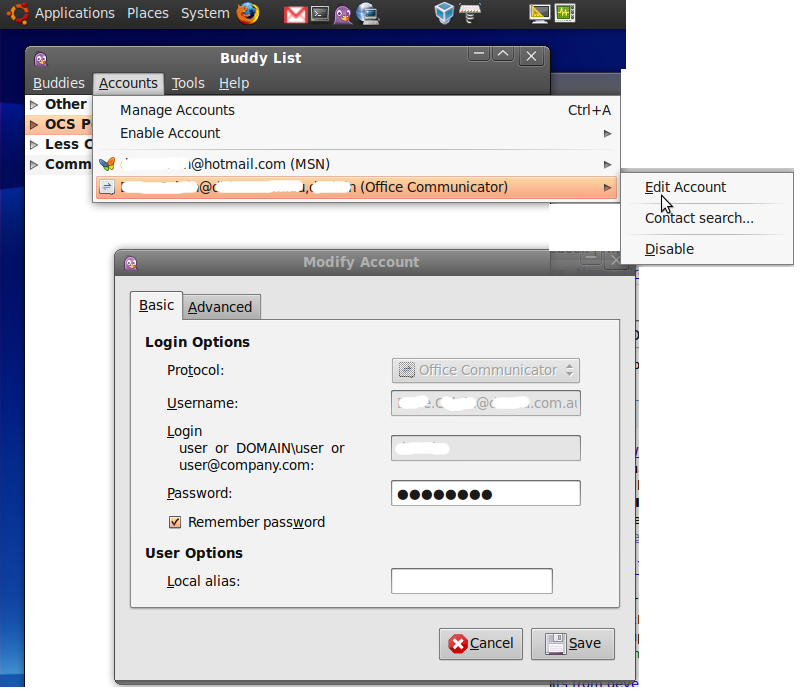
Then to make it work, add a new account:
protocol: Office Communicator
username: email address
login: just the login name
password: secret password
Local alias: optional
ADVANCED: optional
(Connection type: auto, User agent is Purple/1.6.3)


Install pidgin Internet messaging from "add remove applications"
Then get the pre-reqs for OCS:
sudo apt-get install autotools-dev libtool intltool comerr-dev libpurple-bin libpurple-dev pidgin-dev
Download pidgin plugin for OCS (if you have the older version there is no option for "Office Communicator is says LCS/OCS")
http://sourceforge.net/projects/sipe/files/sipe/pidgin-sipe-1.6.3/pidgin-sipe-1.6.3.tar.gz/download
unarchive it, then:
./configure –prefix=/usr/
make
sudo make install
Then to make it work, add a new account:
protocol: Office Communicator
username: email address
login: just the login name
password: secret password
Local alias: optional
ADVANCED: optional
(Connection type: auto, User agent is Purple/1.6.3)
Wednesday, September 09, 2009
Quest NDS migrator error - 1281-41-14-00000000
The following error may be received when entering credentials on the Groupwise System Information screen (Directory Exporter):

Here is where you fix it.


And now it works fine !

Carry one Quest-ing.

ERROR: Unable to login to GroupWise as user 'username'. Please check your user ID. [1281-41-14-00000000]
Cause
Incorrect credentials or the account specified does not have a GroupWise password (Novell and GroupWise objects can have separate passwords).
Here is where you fix it.
And now it works fine !
Carry one Quest-ing.
Tuesday, September 08, 2009
Hyper-V VM's on you laptop?
It would be great to run Hyper-V VMs on my laptop, like the new FIM2010 VMDK from Microsoft.
I could run Windows Server 2008 on my laptop and run in Hyper-V natively but a pain in the arse (re-partition and then dual booting). So I have started using VirtualBox (http://www.virtualbox.org) which is free for personal use - runs on Windows XP/Vista/Linux/Mac. It supports both 64-bit and APIC mode.
Once installed VirtualBox can setup and, import the disk and booted the VM.
After boot, installed Guest Additions (just like Enlightment or VMWare tools. You may also get prompted to reactivate Windows.
Enjoy the convenience and simplisity or free.

I could run Windows Server 2008 on my laptop and run in Hyper-V natively but a pain in the arse (re-partition and then dual booting). So I have started using VirtualBox (http://www.virtualbox.org) which is free for personal use - runs on Windows XP/Vista/Linux/Mac. It supports both 64-bit and APIC mode.
Once installed VirtualBox can setup and, import the disk and booted the VM.
After boot, installed Guest Additions (just like Enlightment or VMWare tools. You may also get prompted to reactivate Windows.
Enjoy the convenience and simplisity or free.